
Download Instructions


If you chose the Electronic Delivery method:
Once you've gone through the payment process, you will be taken to a page that will allow you to download the radio program(s) to your computer. YOU WILL ONLY HAVE 4 HOURS TO DOWNLOAD. Be sure to do this right away. If you have problems downloading, fill out a trouble ticket here.
Clicking the provided link will bring up a save file box. Click SAVE and select a folder on your hard drive to save it to. Remember where you saved it to.
Once the file is downloaded, open up Windows Explorer and go to the folder that you saved the file to. In Windows XP, you can double-click the .ZIP file to run or extract the executable file inside. Windows versions before XP will require a third party extraction program, like WinZip. A free trial version is available here.
Double-click the .exe file. This will run the installation program. Follow the prompts to install to your hard drive. Keep the .ZIP file in case you need to install it again in the future.
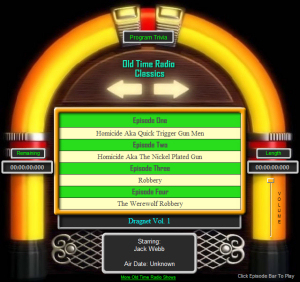
Once you run the program, you will be presented with the nostalgic interface above. Just click one of the episode titles to begin your listening experience.
If you chose the Audio CD:
Nothing to download here. Once you receive the CD (usually in 3-4 days), just pop it into any CD or DVD player, sit back, and enjoy your radio programs.
Once you've gone through the payment process, you will be taken to a page that will allow you to download the radio program(s) to your computer. YOU WILL ONLY HAVE 4 HOURS TO DOWNLOAD. Be sure to do this right away. If you have problems downloading, fill out a trouble ticket here.
Clicking the provided link will bring up a save file box. Click SAVE and select a folder on your hard drive to save it to. Remember where you saved it to.
Once the file is downloaded, open up Windows Explorer and go to the folder that you saved the file to. In Windows XP, you can double-click the .ZIP file to run or extract the executable file inside. Windows versions before XP will require a third party extraction program, like WinZip. A free trial version is available here.
Double-click the .exe file. This will run the installation program. Follow the prompts to install to your hard drive. Keep the .ZIP file in case you need to install it again in the future.
Once you run the program, you will be presented with the nostalgic interface above. Just click one of the episode titles to begin your listening experience.
If you chose the Audio CD:
Nothing to download here. Once you receive the CD (usually in 3-4 days), just pop it into any CD or DVD player, sit back, and enjoy your radio programs.


© 2000 - 2008 Wild West Enterprises Inc. All rights reserved.

HD OLDTIME RADIO CLASSICS
Relive the Golden Age of radio from Westerns to Mystery. Laugh with Burns & Allen, Abbott & Costello, or Jack Benny. Solve crimes with Sgt. Joe Friday, Sam Spade and Philip Marlowe. Clean up the Old West with Gunsmoke, the Lone Ranger or Have Gun Will Travel. Or solve a mystery with Agatha Christie.
Sign up for our Mailing List for announcements of updates and new releases.
Relive the Golden Age of radio from Westerns to Mystery. Laugh with Burns & Allen, Abbott & Costello, or Jack Benny. Solve crimes with Sgt. Joe Friday, Sam Spade and Philip Marlowe. Clean up the Old West with Gunsmoke, the Lone Ranger or Have Gun Will Travel. Or solve a mystery with Agatha Christie.
Sign up for our Mailing List for announcements of updates and new releases.

|
Click for screenshot