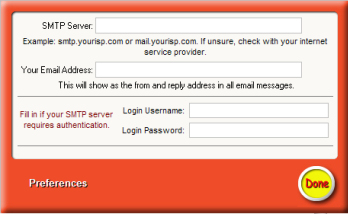
This screen allows you to set the preferences for the
program.
SMTP Server: This should be the smtp
server you use to send mail, usually through your ISP. This may be
mail.yourisp.com or smtp.yourisp.com. This information was probably supplied to
you when you signed up for the service. If unsure, contact your service
provider.
Your Email Address: Enter your
return email address. This will show as the from and reply email address in your
email message.
SMTP Authentication: Some smtp
servers require authentication before you can send. Enter your email username
and password here if this is the case.Click
"Done" to save your settings.
 Your Birthday News